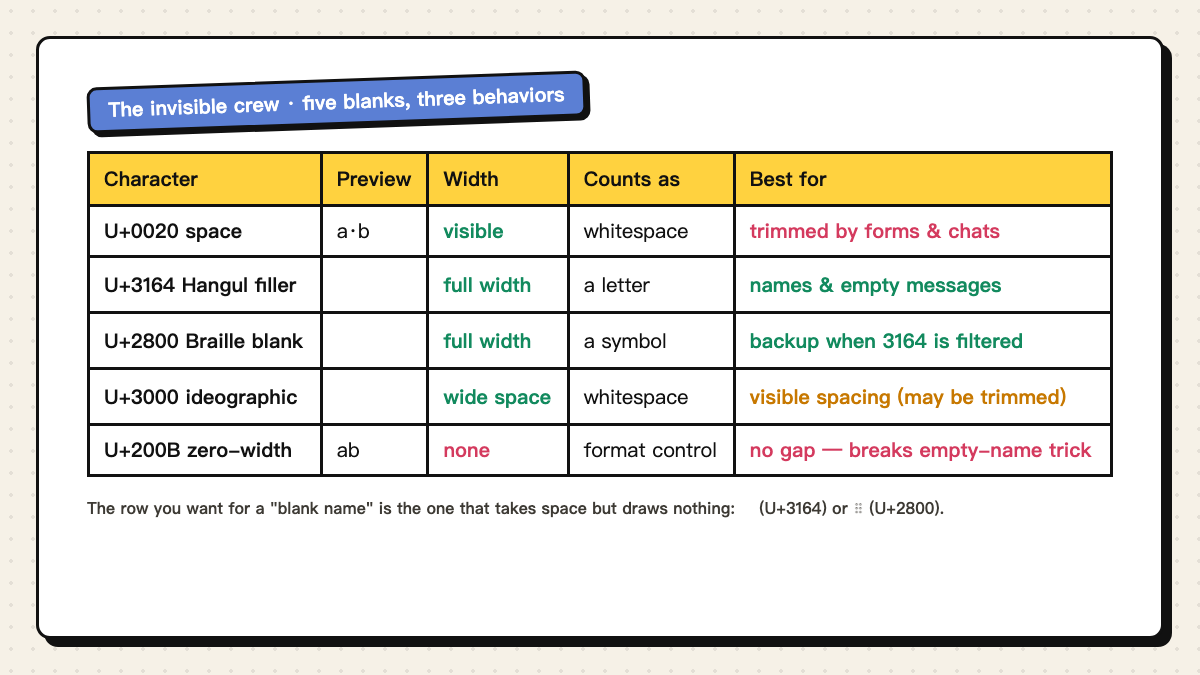
A “blank space you can copy and paste” is not one character — it is at least five, and they fail in completely different ways. The ordinary space bar character gets stripped by almost every form and chat. The Hangul filler takes a full character position, draws nothing, and is the one that actually holds a blank name. The zero-width space takes no position at all, so it defeats the trick it is usually copied for.
This guide explains the mechanism — why apps trim one blank and keep another — then walks each scenario (blank Instagram bio, empty WhatsApp message, invisible Discord or game name), and finishes with a troubleshooting matrix for the four ways a blank “doesn't work.” Every platform treats these characters by its own rules; nothing here replaces a 10-second test paste into the field you actually care about.
Why one blank works and another gets deleted
Apps don't see “a blank” — they see a Unicode code point, and they sort code points into buckets with different rules. The regular space (U+0020) is whitespace, and trimming leading and trailing whitespace is what forms are supposed to do; that is why a space pasted into a name field vanishes on save. The zero-width space (U+200B) is a format control, not content: it occupies no position, so an “empty name” built from it is genuinely empty — many fields refuse it, and it adds nothing to a blank message.
The characters that work take a position but draw nothing. The Hangul filler (U+3164) is classified as a letter, the Braille blank (U+2800) as a symbol, so neither falls under whitespace trimming — the field counts a character, and the screen shows blank. That combination is the entire trick.
One more wrinkle explains the boxes: U+3164 is a letter from the Korean alphabet block. On devices whose font pack has no Korean glyphs it can render as a box □ — harmless in a name field, visible in chat. The Braille blank needs a Braille-capable font for the same reason. Pick by where the text is going, not by which character a random listicle put first.
Which character to pick, per scenario
The short decision table — the same three characters our blank space tool offers, with the two ordinary-space cases for contrast:
| You want… | Use | Why |
|---|---|---|
| Invisible profile or game name | U+3164, fallback U+2800 | Counts as a letter, draws nothing; Braille is the backup when filtered |
| An empty-looking chat message | U+3164 or U+2800, try both | Some clients strip one and keep the other — no universal winner |
| A blank Instagram bio | U+3164 (bio must not be empty) | The field validates non-empty; a position-taking blank satisfies it |
| Spacing between styled letters | U+2800 or U+3000 | Position-taking blanks that survive where plain spaces get collapsed |
| Visible indent in a caption | U+3000 ideographic space | It's a real wide space — the point is that people see it |
The recipes, scenario by scenario
Blank Instagram bio: Instagram refuses an empty bio field, but a single position-taking blank passes validation and renders as nothing. Copy one ㅤ from the blank space tool, paste it into the bio, save. To push text down inside the bio (fake line spacing), use a line holding one blank instead of a fully empty line — empty lines can be collapsed, the blank line keeps its height.
Empty WhatsApp / Messenger message: the send button disables on whitespace-only input, but a Braille blank or Hangul filler is not whitespace, so the message sends and shows as an empty bubble. Client behavior differs — some builds strip one of the two characters — so send both variants to yourself first and keep the one that arrived.
Invisible Discord nickname or status: both the nickname field and the custom status accept a position-taking blank, and the display shows nothing where other members see a gap. Mind the field split: a server nickname is separate from your account-wide display name, and channel names are slugified to plain text no matter what you paste.
Invisible game name (Free Fire and similar): paste one Hangul filler — two or three if the field rejects one — and save. Two honesty notes: single-character names created this way are why “name already taken” sometimes persists even for a blank, so try 2–3 fillers; and community reports circulate about games penalizing fully invisible names, but these are unverified — check the game's current naming policy before committing an account you care about.
Troubleshooting: the four ways a blank “doesn't work”
A general diagnostic that beats every guess: paste the blank into the same app's message or search box first. If the counter increments or the cursor moves twice, the character survived the paste — the failure is then in the target field's rules, not your clipboard.
| Symptom | Cause | Fix |
|---|---|---|
| Blank vanished after saving | Field treated it as whitespace and trimmed | Switch to U+3164 or U+2800 — position-taking, not whitespace |
| Shows as a box □ | Device lacks the glyph (Korean/Braille font missing) | Display-side only; in names it's harmless, in chat try U+2800 or U+3000 |
| “Name already taken” won't clear | One-blank names collide; some servers dedupe them | Use 2–3 blanks, or add one styled letter |
| Paste did nothing at all | Input rejected control characters or the copy missed | Re-copy from the tool with one tap; check the field's counter incremented |
Counting, detecting and cleaning blanks
Every blank that takes a position counts toward character limits — a 20-character run of Hangul fillers is 20 characters toward an Instagram bio's 150. Zero-width characters count too on most platforms, even though they show nothing, which is why a “clean-looking” bio can still be near its limit. The name-length limits guide lists the per-field caps.
To see invisible characters in text you already have, paste it into a code-point counter or the symbol library, where every character is listed with its code point — U+200B and U+3164 stop being mysterious. If a styled nickname came out with stray blanks between letters, regenerating it with the gap setting at zero is faster than hand-deleting invisible characters.