How to Change Your Instagram Bio Font (Step by Step)
Published · Updated
Instagram has no font picker — there is no button anywhere in the app that turns your bio into cursive. What people call an "Instagram font" is a string of look-alike Unicode characters you paste in, and the app's own font renders them. That is the whole trick, and it takes about a minute.
This guide walks through the copy-paste, where styled text works on Instagram and where it does not, and what to check when a pasted font comes out wrong.
What an Instagram bio font actually is
Instagram's text fields hold plain text. When you paste 𝒸𝓊𝓇𝓈𝒾𝓋ℯ instead of cursive, you pasted separate Unicode characters that happen to look like a handwritten alphabet — not a font Instagram applied. That is why the same copied string also works in a TikTok nickname or a Discord status, and why nothing gets installed on your phone.
It also explains the one limitation that matters: a viewer's phone needs a glyph for every character you pasted. Popular alphabets (cursive, bold, small caps) are covered almost everywhere; exotic decorations are where boxes come from.
Change your bio font in five steps
A before/after example, straight from the generator: type coffee and late walks, choose the cursive style, and you copy out 𝒸ℴ𝒻𝒻ℯℯ 𝒶𝓃𝒹 𝓁𝒶𝓉ℯ 𝓌𝒶𝓁𝓀𝓈 — one tap, no app install.
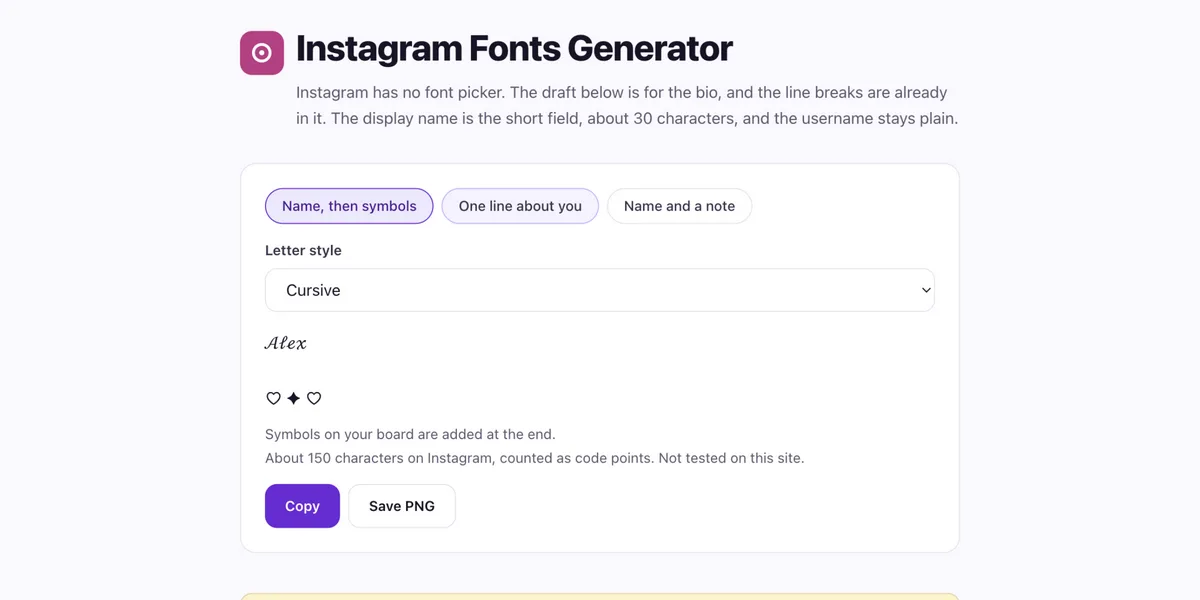
Open the Instagram fonts generator, type the line for your bio, and watch the styles update as you type. The bio draft picker keeps your line breaks in place.
Pick a style. Each result is real text you can copy. If a style looks unusual, open its character report to see which letters changed and which stayed as typed.
Copy the styled line. If you want the line as an image instead — for a post or a story — use the PNG export.
In Instagram, open your profile, tap Edit profile, and paste the line into the Bio field. Paste it the same way into Name if you want the styled look on top of your profile.
Save and look at it in the app. Instagram shows roughly 150 characters in a bio; if your line is longer, the end can get cut, so trim before you publish.
Where styled text works on Instagram — and where it never does
- Bio — works, with line breaks. Around 150 characters, which the generator counts for you before you copy.
- Display name — works, and it is where fonts get seen most: the name shows up in comments and in followers' feeds. It is a shorter field, around 30 characters.
- Username — never. Your @handle only accepts plain letters, digits, periods and underscores, and Instagram applies that to everyone. Keep the handle plain and put the style in the display name.
Which styles travel best
Most "my font turned into boxes" trouble comes from how a style is built, not from Instagram. We measured every style the generator ships, straight from the conversion engine: 20 of 30 swap each letter for exactly one new Unicode character — the safest kind, because there is simply one glyph for the reader's phone to draw. The other 10 (7 strikethrough and underline variants plus 3 strengths of glitch) stack combining marks after each letter, and each stacked mark is another chance for a device to render unevenly.
Digits are their own split: 19 styles also restyle all ten digits, 2 restyle some of them, and 9 leave digits plain — which is why a bold "2026" keeps its numbers while a cursive one does not.
| Style | Each letter becomes | Digits | Notes |
|---|---|---|---|
| Cursive | one character | stay plain | The letters ℯ ℊ ℴ come from older Unicode blocks, so they look slightly different. |
| Bold Cursive | one character | stay plain | — |
| Gothic | one character | stay plain | — |
| Bold Gothic | one character | stay plain | — |
| Bold | one character | styled | — |
| Italic | one character | stay plain | — |
| Bold Italic | one character | stay plain | — |
| Bold Sans | one character | styled | — |
| Sans Italic | one character | stay plain | — |
| Outline | one character | styled | — |
| Monospace | one character | styled | — |
| Small Caps | one character | stay plain | x stays as typed (no styled form exists). |
| Tiny (Superscript) | one character | styled | Only part of the alphabet has a raised form; the rest stays as typed. |
| Subscript | one character | styled | Only part of the alphabet has a sunken form; the rest stays as typed. |
| Bubble | one character | styled | — |
| Circled | one character | styled | — |
| Parenthesized | one character | partly styled | — |
| Squared | one character | stay plain | — |
| Full Width | one character | styled | Spaces widen too. |
| Upside Down | one character | partly styled | Also reverses the string order, so it reads flipped. |
| Strikethrough | letter + 1 mark per letter | styled | — |
| Underline | letter + 1 mark per letter | styled | — |
| Double Underline | letter + 1 mark per letter | styled | — |
| Slashed | letter + 1 mark per letter | styled | — |
| Bold Strikethrough | letter + 1 mark per letter | styled | — |
| Bold Underline | letter + 1 mark per letter | styled | — |
| Italic Underline | letter + 1 mark per letter | styled | — |
| Glitch Light | 0–2 marks per letter | styled | — |
| Glitch Medium | 2–4 marks per letter | styled | Readability drops fast past this strength. |
| Glitch Heavy | 5–8 marks per letter | styled | The highest display risk on the site — expect breakage in strict fields. |
If the paste fails or shows boxes
Boxes (□□□) mean the viewer's device is missing a glyph — the characters arrived, but the phone has nothing to draw for them. The fix is to pick a more common style: the table above puts the one-character-per-letter alphabets in one place, and those are covered nearly everywhere. The mark-stacking styles are the ones that break.
If a paste into the bio comes out wrong, copy the line again from the generator and check the character report for combining-mark styles; strikethrough and zalgo stack marks on every letter and can render unevenly inside Instagram's fields. These are Unicode characters, not an Instagram feature — Instagram can change how it renders them at any time, so paste and check on your own account first.
Related tools
Frequently asked questions
Can I put a fancy font in my Instagram username?
No. The @handle field only accepts plain letters, digits, periods and underscores for every account — there is no workaround, and apps claiming to style usernames are not doing anything real. Style the display name and bio instead; they are the fields people actually see.
Do I need an app or a font keyboard to change my bio font?
No. The whole method on this page runs in a browser: type, copy, paste — nothing to install and no Instagram login anywhere. That is also a useful filter: styling text never requires your password, so be careful with any app that asks for one just to give you fonts.
Which bio styles are least likely to show as boxes?
The one-character-per-letter alphabets: cursive, bold, small caps and their cousins — the table above lists all of them. The stacked-mark styles (strikethrough, underline, glitch) are the ones most likely to render unevenly on some devices.
How many characters fit in an Instagram bio?
About 150 characters. Instagram counts its own way, so the generator's count is a guide, not a guarantee — if the line is longer, trim it and check the saved profile.