Stylish Names in PUBG & Free Fire: How to Change Them, and What to Do When the Paste Fails
Published · Updated
PUBG and Free Fire both let you style your name the same way: the name field holds plain text, and you paste in Unicode characters that look like a decorated font. The catch is that both games keep the field short — around 16 characters in PUBG, around 12 in Free Fire — and both can trim or reject what does not fit.
This guide covers the change itself, the length math that decides whether a name survives, and the paste fixes for the case every iPhone player hits sooner or later: the name simply will not paste.
Generate a name that fits before you touch the game
An example that fits both games with room to spare: the base name Shadow in the bold style comes out as 𝗦𝗵𝗮𝗱𝗼𝘄 — 6 characters. Wrapped in corner brackets, 「𝗦𝗵𝗮𝗱𝗼𝘄」 counts 8, which still clears PUBG's usual 16 with half the budget to spare.
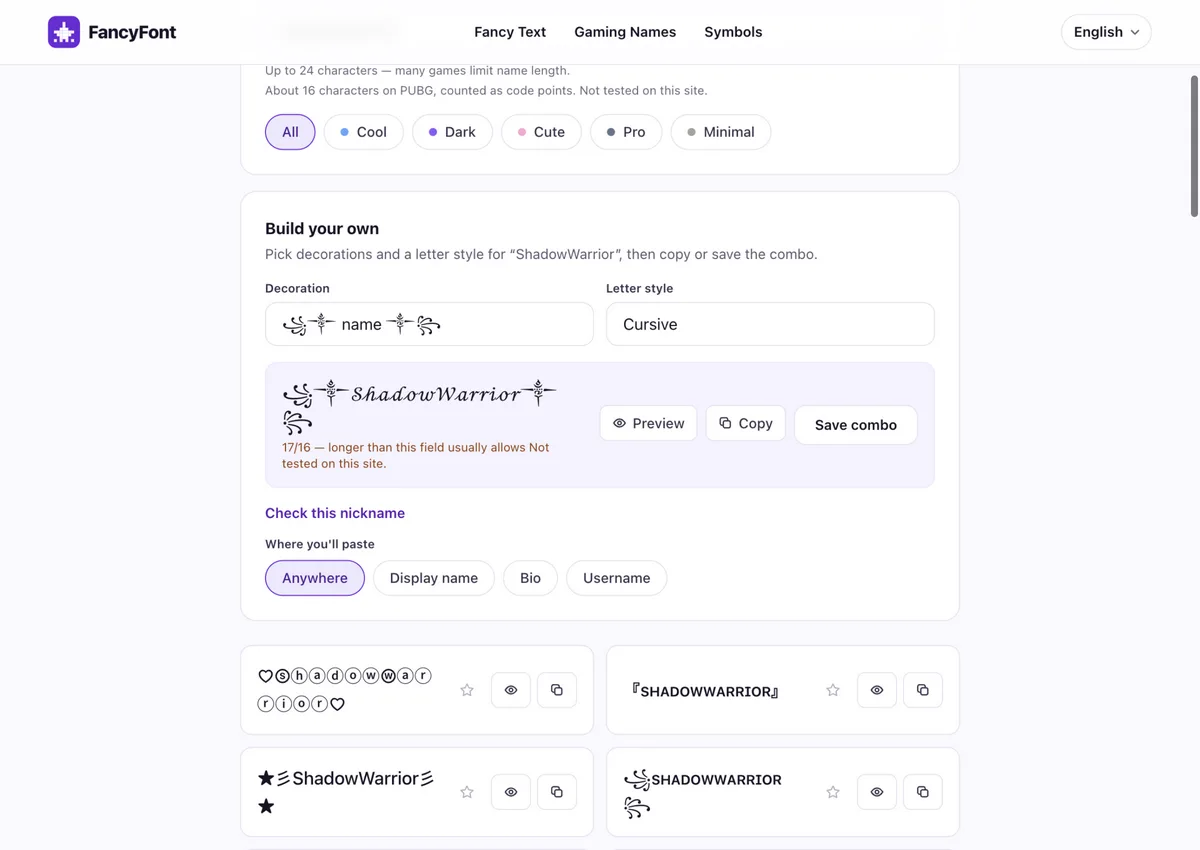
Open the gaming name generator and type your base name. It builds decorated combinations — frames, marks, styled alphabets — from what you type.
Check the length warning. PUBG fields usually take around 16 characters and some modes fewer; Free Fire is around 12 including every symbol. The preview counts code points and flags the name before you copy it.
Copy the combination you like, or build your own from a styled word plus one mark — one mark plus a short word fits more often than a frame on both sides.
In the game, open the screen where names are changed (most players get there with a rename card or item), paste the name, confirm, and look at it in the lobby.
What each decoration costs you
Every decoration pair in the builder was measured against a plain name: 13 of the 20 pairs add exactly 2 code points, the heavy frames add 4, and the star-dust frame (⋆。˚ name ˚。⋆) adds 6. Two details the table makes visible: the skull pair looks like 2 characters but carries a hidden variation-selector code point on each side, and the dot/dash pairs include their spacing spaces in the count.
That math is the whole game on short fields: a +6 frame eats half of Free Fire's about-12 budget before your name starts, while a +2 pair leaves room for an 8-letter styled word inside PUBG's about-16.
| Decoration | Adds around your name | Example with Shadow |
|---|---|---|
| none — plain name | +0 code points | Shadow |
| ꧁༒ name ༒꧂ | +4 code points | ꧁༒Shadow༒꧂ |
| ꧁ name ꧂ | +2 code points | ꧁Shadow꧂ |
| ༺ name ༻ | +2 code points | ༺Shadow༻ |
| ★ name ★ | +2 code points | ★Shadow★ |
| ✦ name ✦ | +2 code points | ✦Shadow✦ |
| ⚡ name ⚡ | +2 code points | ⚡Shadow⚡ |
| ☠︎ name ☠︎ | +4 code points | ☠︎Shadow☠︎ |
| † name † | +2 code points | †Shadow† |
| ♡ name ♡ | +2 code points | ♡Shadow♡ |
| ✿ name ✿ | +2 code points | ✿Shadow✿ |
| 『 name 』 | +2 code points | 『Shadow』 |
| 「 name 」 | +2 code points | 「Shadow」 |
| 【 name 】 | +2 code points | 【Shadow】 |
| 〖 name 〗 | +2 code points | 〖Shadow〗 |
| · name · | +4 code points | · Shadow · |
| — name — | +4 code points | — Shadow — |
| ⋆。˚ name ˚。⋆ | +6 code points | ⋆。˚Shadow˚。⋆ |
| ୨୧ name ୨୧ | +4 code points | ୨୧Shadow୨୧ |
| ☾ name ☽ | +2 code points | ☾Shadow☽ |
If the name will not paste (iPhone and iPad)
The paste failure is usually the phone, not the game: the clipboard never picked the styled string up cleanly, or the game's field ignored the long-press. Players fix it with this sequence:
Copy the name again from the generator, and wait for the copied confirmation before you leave the page.
Open Notes, paste the name there, and look at it. If Notes shows the full styled name, tap into it, select all, and copy again from Notes — this re-copies it as one clean string.
In the game's name field, press and hold until the Paste bubble appears, then lift your finger on Paste. A quick tap will not open the menu.
Still nothing? Shorten the name and try again. Long decorated strings are the ones that fail to paste and get cut; a 6–8 character name almost always goes through.
What these fixes do and don't do
None of these steps change what the game accepts — they only get the characters to the field. The game still filters the name after that, and its filters can change without notice.
That is also why the generator never promises a name will work: it sizes the string and warns on length, but the in-game field is the only test that counts.
If the game cuts your name short or rejects it
- Count symbols as characters. A 16-character PUBG budget includes every bracket and mark; Free Fire's 12 goes fast.
- Drop the decoration first when a name is rejected. A plain short name the game accepts beats a styled one it cuts off.
- Prefer one-character-per-letter styles inside games. Of the 30 styles in the generator, 10 stack extra marks onto every letter — strikethrough, underline and the three glitch strengths. Each stacked mark is another chance for the game's field or another player's phone to trip.
- Remember the ID never changes. The numeric player ID cannot be styled — only the nickname is a text field.
- Re-check after game updates. Both games can tighten their filters; a name that worked last season can turn into boxes this one.
Will other players see the style?
Usually, but it depends on their device: a stylish name renders from the other player's game build and fonts, not yours. Common alphabets show nearly everywhere; heavy decorations are the ones that show as boxes to some players. If the lobby preview looks right on your screen, most players will see what you see — and the players whose phone lacks a glyph will see boxes no matter which decorated style you picked.
Before you spend a rename card, paste the name into a chat or a second device if you have one. The generator's character report also flags the styles that stack combining marks — those are the ones most likely to render unevenly across phones.
Related tools
Frequently asked questions
How long can a PUBG name be?
Plan for around 16 characters, including every symbol. Some PUBG Mobile flows are shorter. The generator's preview counts code points and warns when a name is over 16.
Why won't my stylish name paste in PUBG Mobile on iPhone?
Copy the name again, paste it into Notes first and re-copy it from there, then press and hold the name field until Paste appears. If it still fails, shorten the name — long decorated strings are the ones that drop.
Can I use symbols in a Free Fire name?
The nickname is about 12 characters including symbols, and the game filters what it does not accept. One mark plus a short styled word fits more often than a full frame.
Will a stylish name show for other players?
Only if their game build has the glyph and the name passes the filter. Paste it in and look at the lobby — if you see a box, pick a plainer style.